In-room tablet for guest requests and room control
Guests order food, ask for housekeeping and set the room in English or Arabic. Staff see every request on one board with a timer.
- Apps
- 2
- Languages
- English and Arabic
- Screens shown
- 5
- Layout in Arabic
- Right to left
Three quiet ideas
No sign-in needed
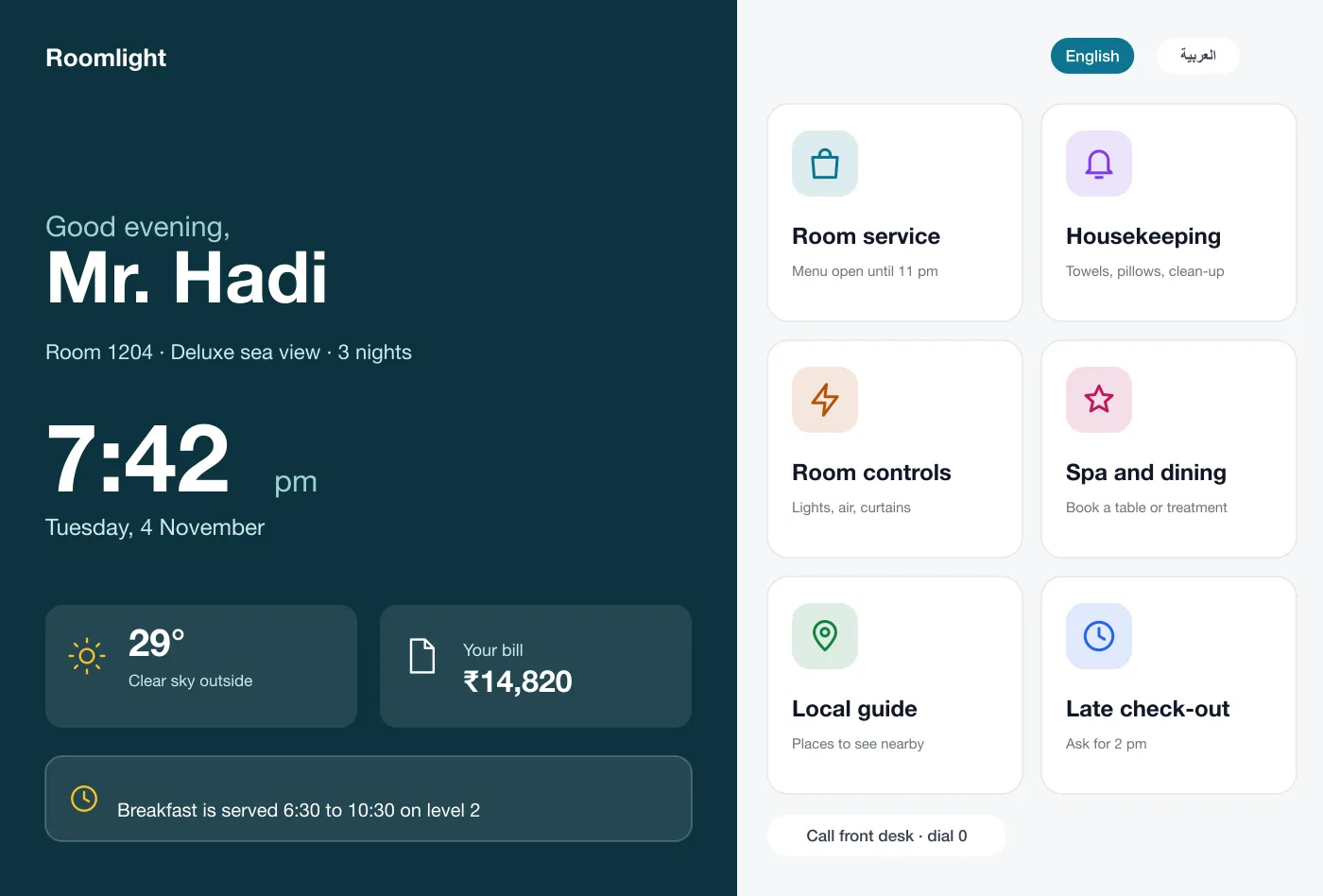
The home screen has six large tiles and works with a touch, so guests never log in.
Requests on one board
Staff see each request with the room number, the time and a running timer.
English and Arabic
One tap switches the language, and Arabic screens flow from right to left.
What the tablet does
Guest home screen
The tablet opens with a welcome, the time, the weather, the running bill and six large tiles for the main services. It works with a touch, with no sign-in.
Room service
The guest browses dishes by type, adds them, picks a delivery time and writes a note for the kitchen. The total is added to the room bill.
Housekeeping requests
The guest taps for extra towels, a clean-up or an iron. The request goes to housekeeping with the room number and the time.
Room controls
Sliders set the lights and a dial sets the air. Scenes such as relax or sleep change several things at once. A do not disturb switch shows a sign on the door.
English and Arabic
One button switches the language. In Arabic the whole screen is mirrored, with the text and controls flowing right to left.
Staff request board
Requests sit in three columns: new, in progress and done. Each has a timer, and the board also shows room status for cleaners and the front desk.
One evening, four requests
Order dinner
The guest picks two dishes, chooses a time and sends the order. The kitchen sees it at once and the guest sees the status.
Ask for towels
The guest taps once. Housekeeping gets the request with the room number and marks it done from a phone.
Set the room
The guest picks the sleep scene. The lights dim, the air settles and the do not disturb sign comes on.
Catch a late request
A request waits more than 20 minutes. It turns red on the board and a supervisor sends the nearest staff member.
Guests. Order food, ask for towels and set the lights with a few taps.
Kitchen and housekeeping. See each request as it comes in and mark it done from a phone.
Hotel managers. Watch late requests turn red so that none are forgotten.
Questions
What is an in-room tablet for hotels?
It is a tablet fixed in a guest room. The guest uses it to order food, ask for housekeeping, control lights and air, and read hotel information without calling the front desk.
Which systems does an in-room tablet need to connect to?
Most hotels link it to the property management system for guest names and the room bill, to the kitchen order screen, and to smart room controls if the rooms have them. Each link can be added in its own phase.
Can you build an in-room guest app like this for my hotel?
Yes. We can build the tablet app, the staff board for your teams, and connect it to your billing system and, if you have them, smart room controls.
Does it work in Arabic?
Yes. The guest can switch language at any time. In Arabic the whole screen flips to read right to left, and staff see requests translated into their own language.
How do staff know a request is waiting too long?
Every request shows a timer. Requests that wait past the hotel's goal turn red on the board so a supervisor can send someone.
Try the guest tablet screens
Try the appWalk through a dinner order, a towel request and the sleep scene.